Showing posts with label Oracle. Show all posts

Friday, October 14, 2016

How to associate statistics to a function - Part 2

In our second and last part about association of statistics to PL/SQL functions in Oracle we’ll take a look at how to estimate I/O and CPU usage.

First we’ll try to measure I/O. Let’s have a procedure discount from an online shop. All that it does is that I takes order ID and applies requested discount on it. For I/O measurement we’ll use handy PL/SQL program called mystats which is variation on Jonathan Lewis's SNAP_MY_STATS package to report the resource consumption of a unit of work between two snapshots. You can get it here: https://github.com/oracle-developer/mystats.

Simple example of usage should look like follows:

set serveroutput on
/

begin
 mystats_pkg.ms_start;
end;
/

begin
 discount(1,20);
end;
/

begin
 mystats_pkg.ms_stop(mystats_pkg.statname_ntt('consistent gets','db block gets'));
end;
/

rollback
/


Output will look something like this:


From report we see that our measured I/O is 14. This is very simple and probably not very representative test. It would be a good idea to give procedure more iterations over different data and then divide results by number of iterations.

Now that we now how much I/O will function usually consume, we can focus on CPU.  For CPU estimate we will use PL/SQL function called DBMS_ODCI.ESTIMATE_CPU_UNITS (https://docs.oracle.com/cd/B19306_01/appdev.102/b14258/d_odci.htm#i996771) which returns the approximate number of CPU instructions (in thousands) corresponding to a specified time interval (in seconds).

We can do something like this with following output:

set serveroutput on
/

declare
 v_start PLS_INTEGER := DBMS_UTILITY.GET_TIME;
 v_end PLS_INTEGER;
begin
 mtg.order_pkg.discount(1,20);
 v_end := DBMS_UTILITY.GET_TIME;
 dbms_output.put_line('Time:'||to_char((v_end-v_start)/100,'999,999.999'));
 DBMS_OUTPUT.PUT_LINE(ROUND(1000 * DBMS_ODCI.ESTIMATE_CPU_UNITS(v_end-v_start)/100,0));
end;
/


rollback
/


Again I would advise you to give it more iterations to get nicer picture a use average value.

Sunday, May 29, 2016

Where clause predicate evaluation order


On my lectures I get quite often asked about how Oracle chooses evaluation order in where clause. It’s quite interesting question so I’ve decided to make today’s blog post about that. Officially Oracle says as follows:

Some of the things that influence the order of application of the predicates are:
Their position in the WHERE clause
The kind of operators involved
Automatic Datatype conversion
The presence of bind variables
Joins
The optimizer mode (Rule or Cost)
The cost model (IO or CPU)
The Query Rewrite feature
Distributed operations
View merging
Query Un-nesting
Other Documented and Undocumented Parameters
Hints

In addition, the optimizer can also add, transform or remove predicates. One example being transitivity:

a=1 AND a=b

Seeing that, Optimizer knows that b must be equal 1 and adds that to where clause creating following result

a=1 AND a=b AND b=1

This all might seem little confusing. So let’s simplify all of this in one sentence. Basically Oracle is trying to figure out best order of evaluation of predicates so that he can as soon as possible AND as cheaply as possible find out that he can throw away current row. So in that context he wants to check most selective and cheapest predicates first so he can cheaply and right away find out that he does not want current row.

After all we have said here you’ll definitely deduce, that Oracle will very likely evaluate constant predicate 1st, functions second and he will try to keep those pesky subqueries to the last if possible.

Well that is logical, right? Yes, it is and a lot of developers know that and tend to count on that … and bad things happen as usual :)

Let’s make a little demonstration:

CREATE TABLE where_table AS
SELECT * FROM dba_objects;
UPDATE where_table SET object_type = NULL WHERE object_type != 'INDEX';
COMMIT;

CREATE OR REPLACE FUNCTION my_where_func(
    v VARCHAR2)
  RETURN VARCHAR2 DETERMINISTIC
IS
  d pls_integer;
BEGIN
  IF v='INDEX' THEN
    RETURN(v);
  ELSE
    RAISE_APPLICATION_ERROR(-20000, 'NULL not allowed');
  END IF;
END;
/

As you can see, we have a table which is copy of dba_objects and we make it so that object_type column has value NULL or INDEX. Our function is also very simple. When it gets INDEX it returns INDEX. On any other value it throws an error.

Ok. Now let’s have this simple query:

SELECT *
FROM where_table
WHERE owner                   IS NOT NULL
AND object_type                = 'INDEX'
AND my_where_func(object_type) = 'INDEX';

Logically, Oracle will evaluate if object_type is equal to INDEX 1st (its cheapest and most selective check), then he will check whether owner is not null (still very cheap but not so selective) and after all of that, IF row still survives, he’ll call our function (it costs him more CPU then previous predicates).

Now let us run our query and see what we get:

SQL Error: ORA-20000: NULL not allowed
ORA-06512: at "TESTDBA.MY_WHERE_FUNC", line 9

Now being very clever reader you are, you know that only way this can happen is that our function was called with NULL. But how is this even possible when object_type = 'INDEX' should be checked 1st. Ok, let us see the execution plan:


Well, this is not what we were expecting at all. This is not even remotely right. But how is this possible? Well the reason is simple … I cheated. After the creation of my_where_func I ran this:

ASSOCIATE STATISTICS WITH FUNCTIONs my_where_func DEFAULT COST (1,0,0);

Basically I told Oracle that CPU cost of that function is 1, IO cost is 0 and network cost is 0. So he thinks it’s very very cheap. You might wonder what my point here is. Well, my point is that sometimes Oracle messes up (wrong stats, damaged stats) and will do things like this. You should take that into account when designing your functions. Just a month ago I was helping with issue when report ran for 1 year without any problem and on one day from 23:44 it started to crush with ORA-06502: PL/SQL: numeric or value error: NULL index table key value. Problem was same select as stated before and developer counted on Oracle to call his function last. He was using passed value as a key to associative array and didn’t check the input ‘cos he knew that all not null values must be in index of that array. But Oracle did change order of evaluation and null happened.

Now don’t forget that we are talking about filter predicates. Access predicates on indexes are of course used first.

You might ask youself what happens when Oracle can’t decide which of your two predicates is more expensive. Well he keeps them in order you placed them in your where clause. So sometimes it is good to do a little ordering in your where clause. BUT best think you can do is to TELL Oracle how much each of your functions costs so he knows. We’ll look at how to do that next time.


Wednesday, May 18, 2016

Think simple and spare yourself a facepalm session

I think it’s time to share my presentation from Think simple and spare yourself a facepalm session, which I was presenting at BGOUG & DOAG 2015:

Wednesday, May 11, 2016

Beginner's mistakes in PL/SQL - Part 4

In this post we’ll have a final look on our little PL/SQL program as this is going to be an end to our Beginner's mistakes in PL/SQL series ... for now ;).

We’ll going to take a look at last (yet very important) structural flaw in our PL/SQL code. If we take a closer look at our code, we’ll discover that there are several function calls in main data fetch cycle. 

We are talking about functions:
  • get_indexes
  • has_nullable
  • has_default
  • get_columns

If we look at them, we’ll discover that pure goal of these functions is to produce concatenated list of indexes and columns for particular object or to provide a flag on existence of nullable columns and defaults.

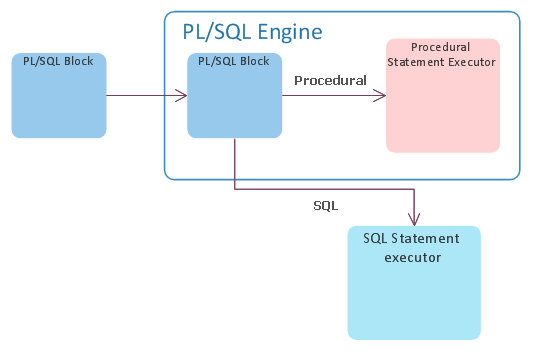
This approach has a HUGE negative impact on performance. Reason for that is an event we call “the context switch”. This event occurs because Oracle has two language processing engines:
  • Database engine – which has SQL statement executor (he knows how to execute and process SQL statements)
  • PL/SQL engine – which is capable of processing PL/SQL procedural language

Here is a nice picture of how your PL/SQL code processing looks like in Oracle:


So, every time PL/SQL engine sees an SQL statement, he basically takes it and sends it to the database engine for execution and waits for results. This act of “outsourcing” is what is called context switch and is quite CPU expensive. This phenomenon is not only about execution your SQL but also about receiving data from it. In our example, the code creator is nicely fetching data from main select by 5000 rows into an array, so he does not need to ask SQL engine for every row. He just asks for next batch of 5000 hence minimizing number of context switches while fetching the data.

Our goal is that if we have to call a SQL statement, we want to get most out of it. We want to get our data, play with it, and when we are done, ask for next batch of them.

It seems that in this case the programmer didn’t see any efficient way (or any way at all) how to get the information he needs from main query. My guess is that the issue here was the pivoting. He didn’t know how to take the list of indexes (or columns) and produce that list as one line. Because this is a simple concatenation problem; one function comes to my mind – LISTAGG. It’s basically an aggregation by concatenation function. Only limitation we have here is that LISTAGG cannot produce string longer than 4000 bytes (for purposes of this demonstration we’ll pretend it’ll never happen :) ).

So, we know now that we CAN put EVERY function we listed above into our main SQL statement and thus eliminating number of context switches by huge amount. We'll not only eliminate the function calls but also the bunch of context switches that are produced by FOR cycles in those functions.  Here is how it’s done:

1. We’ll have to change our data model a little bit so we can store few new columns

DROP TABLE my_data_tmp
/

CREATE GLOBAL TEMPORARY TABLE my_data_tmp
( table_name VARCHAR2(30) NOT NULL,
partitioned VARCHAR2(3),
temporary VARCHAR2(1),
index_list VARCHAR2(4000),
has_nullable VARCHAR2(1),
has_data_default VARCHAR2(1),
column_list VARCHAR2(4000)
) ON COMMIT DELETE ROWS
/

2. Now we can rewrite our main query as follows

    INSERT INTO my_data_tmp
    SELECT tabs.table_name,
           tabs.partitioned,
           tabs.temporary,
           idxs.index_list,
           COALESCE(CASE WHEN cols.count_nullable > 1 THEN 'Y' ELSE 'N' END, 'N'),
           COALESCE(CASE WHEN cols.count_data_default > 1 THEN 'Y' ELSE 'N' END, 'N'),
           cols.column_list
    FROM my_tables tabs
    LEFT OUTER JOIN
    (SELECT /*+ PUSH_PRED */
            object_id_table,
            LISTAGG(index_name,',') WITHIN GROUP (ORDER BY index_name) index_list
     FROM my_table_indexes
     GROUP BY object_id_table
    ) idxs
    ON (idxs.object_id_table = tabs.object_id)
    LEFT OUTER JOIN
      (SELECT /*+ PUSH_PRED */
              object_id,
              LISTAGG(column_name,',') WITHIN GROUP (ORDER BY column_id) column_list,
              COUNT(CASE WHEN nullable = 'Y' THEN 1 ELSE NULL END) count_nullable,
              COUNT(CASE WHEN data_default = 'Y' THEN 1 ELSE NULL END) count_data_default
       FROM my_table_columns
       GROUP BY object_id
      ) cols
    ON (cols.object_id = tabs.object_id);

I had to use PUSH_PRED hint to force Oracle to push object_id into the subquery so that everything is nice and tidy.

As you can see we were also able to easily get all the flags we needed inside the main query without any extra performance hit. We just took advantage of data we had to read anyway.

Now let us compare run times of old and new version of our code after all the work we had done on it.

Old version:

System FLUSH altered.
PL/SQL procedure successfully completed.
Start tmp 19:55:10
End tmp 19:55:10
Start blob 19:55:10
Exported 3306 rows
End blob 19:56:05

New version:

System FLUSH altered.
PL/SQL procedure successfully completed.
Tmp loaded in         .71 sec
Exported 3306 rows in         .16 sec

Ok that’s 55 seconds vs 0.87 of second. I think that the result is so obvious that we don’t even have to check for stats.

You can download the final package code here:

data_to_ascii.pkb

Thank you for bearing with me through all 4 parts of this series and see you soon.

Monday, April 25, 2016

Beginner's mistakes in PL/SQL - Part 3

Welcome to the Beginner's mistakes in PL/SQL - Part 3. In the last Blog, I’ve posed a question about this particular piece of code:

SELECT COUNT(*) INTO v_num_records FROM my_data_tmp; 

Well the point here is that why should I select the temporary table one more time to count number of rows, if I had it directly at hand before in form of information from cursor - SQL%ROWCOUNT.

Another thing is that there is no application orchestration what so ever in our code. If we try to locate our batch job in v$session view, our only way is by sniffing around and checking active SQL (if it is not run under particular user). Big, big mistake. So we will add some application and stage identification:

dbms_application_info.set_module(module_name => 'data_to_ascii',
                                                    action_name => 'load_tmp_table');

We will add this kind of information into other functions in our package, so that when we observe the session, we can easily see in which state our export is.

Last but not least I do not like our time measurement technique. First problem is, that SYSDATE is basically macro for

SELECT SYSDATE FROM DUAL;

That means that each call is PL/SQL – SQL context switch, which is quite expensive. Secondary it is not very precise, ‘cos it can measure only with precision up to 1 second. PL/SQL has much better tools for time measurement and it’s pure PL/SQL. That means no context switching and precision up to 1/100 of second. That tool is

dbms_utility.get_time;

This function returns PLS_INTEGER. By capturing this number in two points in time, you can get number of 100th of seconds between those two points. It’s very fast and very lightweight. The only thing you should keep in mind is, that counter number can wrap around, so if you measure for “very long time” the difference you’re going to get is nonsense.

After all what was said, sample code from package should look like following:

CREATE OR REPLACE PACKAGE BODY data_to_ascii AS
  --
  -- Number of rows in tmp table
  vg_row_count PLS_INTEGER;
  --
  -- Loades data into the temporary table
  --
  PROCEDURE load_tmp_table
  IS
    v_start PLS_INTEGER := dbms_utility.get_time;
    v_end   PLS_INTEGER;
  BEGIN
    --
    -- Orchestration
    --
    dbms_application_info.set_module(module_name => 'data_to_ascii',
                                     action_name => 'load_tmp_table');
    --
    DELETE my_data_tmp;
    --
    INSERT INTO my_data_tmp
    SELECT tabs.object_id,
           tabs.table_name,
           tabs.partitioned,
           tabs.temporary
    FROM my_tables tabs;
    --
    -- Get number of lines processed which is number of rows in temporary table
    --
    vg_row_count := SQL%ROWCOUNT;
    --
    -- Measure
    --
    v_end := dbms_utility.get_time;
    dbms_output.put_line('Tmp loaded in ' || TO_CHAR((v_end - v_start) / 100, '999,999.99') || ' sec');
    --
  END load_tmp_table;
  ...

Continue to Part 4.

Friday, March 4, 2016

Join predicate push down issue

This blog post is about very interesting issue with Oracle Optimizer which I do dare call a bug. To be honest with you I’ve spend couple of evenings on it since it was driving me crazy :). I knew what was going on but I wanted to force the Oracle to do the right thing. In the end I had to revert to backup solution.


Now, let’s start from the beginning. I’m providing all the things you need to be able to play with it on your own. Problem was spotted on Oracle 11.2.0.4.0. Here is the script to prepare data model for the demonstration:

CREATE OR REPLACE FORCE TYPE number_object IS OBJECT
(
 n NUMBER
);
/

CREATE OR REPLACE FORCE TYPE number_table AS TABLE OF number_object
/

CREATE TABLE list_agg_overflow
(
 n NUMBER,
 v VARCHAR2(1000)
);
/

CREATE INDEX list_agg_overflow_ix ON list_agg_overflow(n);
/

CREATE TABLE list_agg_overflow_output
(
 n NUMBER,
 v VARCHAR2(4000)
);
/

CREATE GLOBAL TEMPORARY TABLE list_agg_overflow_tmp
(
 n NUMBER
);
/

DECLARE
  v_dummy VARCHAR2(1000) := LPAD('X',1000,'X');
BEGIN
  --
  FOR i IN 1 .. 2
  LOOP
    INSERT INTO list_agg_overflow VALUES (1, v_dummy);
  END LOOP;
  --
  FOR i IN 1 .. 10
  LOOP
   INSERT INTO list_agg_overflow VALUES (2, v_dummy);
  END LOOP;
  --
  dbms_stats.gather_table_stats(null, 'list_agg_overflow');
  --
  COMMIT;
END;
/

As you can see, we have a list_agg_overflow table, which has 2 rows of id 1 and 10 rows of id 2. Each row contains a text of length 1000 characters. This is important since we are going to exploit it a little bit later. Now we run following anonymous PL/SQL block:

DECLARE
  v_output VARCHAR2(16384);
BEGIN
  --
  INSERT INTO list_agg_overflow_tmp VALUES (1);
  --
  INSERT INTO list_agg_overflow_output
  SELECT
    /*+ qb_name(main) leading(n_list a j) dynamic_sampling(0) */
    a.n,
    j.v
  FROM list_agg_overflow a,
       list_agg_overflow_tmp n_list,
       (SELECT
          /*+ qb_name(agg) push_pred */
          n,
          LISTAGG(v, ',') WITHIN GROUP (ORDER BY n) v
        FROM list_agg_overflow
        GROUP BY n
       ) j
  WHERE a.n = n_list.n
    AND a.n = j.n(+);
  ROLLBACK;
END;
/

We run the script with no error as expected. PL/SQL block is fairly simple. Basically we insert a list of IDs (column n) into our temporary table. Point of the query is to pick that list and join it on table a (as nested loop) and then join the result onto our subquery which does aggregate and creates a concatenation of text based on ID. We do want to push join predicate into subquery agg and it’s definitely possible, since we are aggregating by column we want push inside. Last join was outer and I left it there. It has no impact on query output (in original query it had) or our problem.

Here we see execution plan which looks as we want it to look:


Now let’s make a little change (and that’s how the query looked in 1st place). Let’s assume we have our list of IDs in an array. We can definitely do that and there might be a very good reason why to do so. Our block would look like this:

DECLARE
  v_list_tab number_table := number_table();
  v_output VARCHAR2(16384);
BEGIN
  --
  v_list_tab.EXTEND;
  v_list_tab(v_list_tab.FIRST) := number_object(1);
  --
  INSERT INTO list_agg_overflow_output
  SELECT
    /*+ qb_name(main) */
    a.n,
    j.v
  FROM list_agg_overflow a,
       TABLE(v_list_tab) n_list,
       (SELECT
          /*+ qb_name(agg) push_pred */
          n,
          LISTAGG(v, ',') WITHIN GROUP (ORDER BY n) v
        FROM list_agg_overflow
        GROUP BY n
       ) j
  WHERE a.n = n_list.n
    AND a.n = j.n(+);
  ROLLBACK;
END;
/

Now let’s run it and see this:

Error report -
ORA-01489: result of string concatenation is too long
ORA-06512: at line 9
01489. 00000 -  "result of string concatenation is too long"
*Cause:    String concatenation result is more than the maximum size.
*Action:   Make sure that the result is less than the maximum size.

Oook? Now only way this error could have happend is, that our join predicate was not pushed. LISTAGG can concatenate only up to 4000 characters and ID = 2 has 10 rows so it forces LISTAGG to overflow. Let’s check the execution plan:


Yeap … no push.  Now you can try to fight it but only way I found around it ether to say … screw array I’m going to use temporary table or do a partial step forward and change the query to this (IN can be ofcourse done as join):

DECLARE
  v_list_tab number_table := number_table();
  v_output VARCHAR2(16384);
BEGIN
  --
  v_list_tab.EXTEND;
  v_list_tab(v_list_tab.FIRST) := number_object(1);
  --
  INSERT INTO list_agg_overflow_output
  SELECT
    /*+ qb_name(main) */
    a.n,
    j.v
  FROM list_agg_overflow a,
       TABLE(v_list_tab) n_list,
       (SELECT
          /*+ qb_name(agg) push_pred */
          n,
          LISTAGG(v, ',') WITHIN GROUP (ORDER BY n) v
        FROM list_agg_overflow
        WHERE n IN (SELECT n FROM TABLE(v_list_tab))
        GROUP BY n
       ) j
  WHERE a.n = n_list.n
    AND a.n = j.n(+);
  ROLLBACK;
END;
/

Now there must be a reason for that. Why is Oracle pushing join predicate when we use temporary table and not if we use array? Now I believe it is an Optimizer bug. I’ve searched Oracle Support but I haven’t found anything about it. Might be that I used wrong key words. Anyway, to back my claim up I’m presenting except from Optimizer trace files which I made. 

Trace with temporary table:


Now with array:


Well of course it’s possible. He has done it before. The only reason that comes to my mind is, that Optimizer thinks it’s not possible, is a BUG in code ... or some nice FEATURE :).

However what you should take from this is not to not use arrays in SQL but to be more on guard when using them in some special cases.

Friday, February 19, 2016

Night-time quiz


Since I do not have anything I think would be interesting for you guys, I’ve created a little quiz for you.


You have a following table definition and data:

CREATE TABLE my_table
(
 id       NUMBER(3),
 item_cnt NUMBER(3),
 log_time DATE
)
/
CREATE UNIQUE INDEX my_table_ix1 ON my_table(id)
/
ALTER TABLE my_table ADD CONSTRAINT my_table_pk PRIMARY KEY (id)
/

INSERT INTO my_table VALUES (1, NULL, NULL)
/
INSERT INTO my_table VALUES (2, NULL, NULL)
/
INSERT INTO my_table VALUES (3, NULL, NULL)
/
COMMIT
/

Now we have following anonymous PL/SQL block:

DECLARE
 v_id my_table.id%TYPE := 1;
 --
 PROCEDURE ins (p_id my_table.id%TYPE)
 IS
 BEGIN
  INSERT INTO my_table VALUES (p_id, NULL, NULL);
END;
 --
BEGIN
 DELETE my_table WHERE id = v_id;
 ins (v_id);
END;
/

The question is … With what change to the code would you force a dead lock using same id?

Looking forward to your ideas …

UPDATE:

Thank you all for your comments :) He is the solotion:


DECLARE
 v_id my_table.id%TYPE := 1;
 --
 PROCEDURE ins (p_id my_table.id%TYPE)
 IS PRAGMA AUTONOMOUS_TRANSACTION;
 BEGIN
  INSERT INTO my_table VALUES (p_id, NULL, NULL);
END;
 --
BEGIN
 DELETE my_table WHERE id = v_id;
 ins (v_id);
END;
/

00060. 00000 - "deadlock detected while waiting for resource"
*Cause: Transactions deadlocked one another while waiting for resources.
*Action: Look at the trace file to see the transactions and resources
involved. Retry if necessary.

Tuesday, January 19, 2016

Index on sub partition column


I was about to name this blog post “Index mud” but no one would ever google it. So we’ll go with simple name “Index on sub partition column”.

You might call this another OTN post and you would be right. But I think it is a good example of usual – how to NOT do it.

The question was following:

Hi,
I am working on oracle 11g R2 on HP-UX platform.
We need to create a partition table have range (date) and sub partition by list (values) partition. I want to know if column we are using for sub partition (values ) is also need to index as we need to use that column in many of our select queries in where clause.

One member jump in and gave a simple answer:

Yes

.. And I was marked useful? Yap ... simple answer simple click. Not good guys, not good at all.

I presented a different opinion:

Since you are sub partitioning by list, I would expect there are not many values in list for particular sub partition? I would expect that selectivity will be quite low and index might not be of any use at all ... Unless you are selecting only indexed columns, for example.
With low selectivity partition prune will probably suffice. In your case I would do some testing with representative queries as index value is questionable here.

Ok. Let’s have a little presentation here. I’ve created table table1 with four indexes:

CREATE TABLE TABLE1
(
 P NUMBER(3),
 S NUMBER(1),
 filler VARCHAR2(100)
)
PARTITION BY RANGE (P) SUBPARTITION BY LIST (S)
(PARTITION P10 VALUES LESS THAN (11)
 (SUBPARTITION P10_3 VALUES (1,2,3),
  SUBPARTITION P10_6 VALUES (4,5,6),
  SUBPARTITION P10_9 VALUES (7,8,9)),
PARTITION P20 VALUES LESS THAN (21)
 (SUBPARTITION P20_3 VALUES (1,2,3),
  SUBPARTITION P20_6 VALUES (4,5,6),
  SUBPARTITION P20_9 VALUES (7,8,9)),
PARTITION P30 VALUES LESS THAN (31)
 (SUBPARTITION P30_3 VALUES (1,2,3),
  SUBPARTITION P30_6 VALUES (4,5,6),
  SUBPARTITION P30_9 VALUES (7,8,9)));

CREATE INDEX TABLE1_IX1 ON TABLE1(P,S) LOCAL;

TABLE1 has 379MB and TABLE1_IX1 has 54MB.

Each sub partition has around 100 000 rows for each list value (filler column has maximum size in each row). We are not going to go into the index details like testing different column combinations, etc. That is not important right now.

Now if you think about it, why would Oracle have any use for an index in following SQL?

SELECT * FROM TABLE1 WHERE P=10 AND S=4;

We are selecting all columns and selectivity of predicates in given sub partition is 33,3%. Let’s check the run statistics:


Ok. Now let’s force our index:

SELECT /*+ INDEX(TABLE1(P,S)) */ * FROM TABLE1 WHERE P=10 AND S=4;


Now as you can see (check Buffers and Reads), there is no point of using our index in this case as it is more expensive then sub partition full table scan.

Now there are queries, where index will be beneficial, like:

SELECT P,S FROM TABLE1 WHERE P=10 AND S=4;


So what should you take from this is, that you should not jump into rush conclusions when adding index but think it through. You should ask yourself questions like

  • What kind of queries will you use?
  • Which columns will you be most likely selecting?
  • What is selectivity of predicates?

It’s no point in wasting space and performance on maintaining index you don’t need.

Thursday, December 17, 2015

One does not simply create table with 300 columns


There was quite an interesting post on Oracle OTN, which is worth of this blog post and meme.

Problem was defined as follows:
I have a table which has 300 columns and keeps records 60,00,000 at this time. Records are increasing day by day. When I run a simple query like:

select * from table where store_no = 17

this query takes 30 to 60 seconds for fetching the data against this query which is to much time, while I'll use this table with more filters. Can anyone help me that how i can increase data fetching performance, i have also used a primary key indexing.

If you check supplied DDL against given SQL, you'll likely come to two points
  1. There is no index on column store_no and so Oracle will have to do full table scan
  2. ... 300 columns!?


My suggestion was to reconsider the data model. 300 columns are pretty rough and columns like IT_CLERK_ID2. IT_CLERK_ID3, ... , IT_CLERK_ID5 tend to be suspicious.

Reason for my suggestion was that Oracle will have to split rows in this table in two pieces because they have more than 255 columns. Interestingly enough, the split will be done from the end of the row. So first piece of the row will have first 45 columns and second piece will contain 255 columns. What should come to your mind now is that order of columns in such table is very important and you should place columns you are going to select as close as possible to the start of the row.

Result of this split will be extra CPU usage when selecting rows from second piece. Secondary result might come in form of row chaining between database blocks which will introduce additional single block reads to walk your rows.

Now let's have a little test. I've created two tables where all columns are VARCHAR2 with value 'X' except first and last column which is NUMBER with value 1. First table has 250 columns and second has 300.

I've traced four following SQL statements:

SELECT SUM(c1) from table_250;
SELECT SUM(c250) from table_250;
SELECT SUM(c1) from table_300;
SELECT SUM(c300) from table_300;

Let's check important parts of trace files:


As you can see, sum of column c300 is quite CPU heavy. There are also other consequences of row chaining with connection to table full scan and buffer cache ... which is not as good as you can guess by now.

I would encourage you to check blog post by Jonathan Lewis which covers buffer cache and other important things.

So remember folks ... one does not simply create 300 columns table. You have to have very good reason for that and you have to think about order of columns and consequences.

Wednesday, December 2, 2015

Oracle hint ignore_row_on_dupkey_index - part 2

Last time we’ve seen that there is something really sneaky going on when we use hint ignore_row_on_dupkey_index. We have several clues for that:

  1. 1.85 seconds vs 1:27.96 with hint. That’s about 50x slower.
  2. 133 369 logical reads vs 1 156 645. That’s almost 9x more.


Another thing you would definitely find strange is the difference in sizes of trace files: 22 KB vs 35 MB … that’s quite huge.

So let’s open the larger one and see if we can spot anything strange:


It’s cursor #140056955737968 craziness! It’s getting called again and again and ….

Ok, let’s have a look how many times it’s actually called


Remember how many rows which table had? Let me remind you
  • table1 with 100 000 rows 
  • table2 with 199 001 rows from which 99 001 have same primary key value like rows in table1

So this SQL is called EXACLY as many times as there are matching keys (duplicates)!

What this query seems to do is to select names of owners and names of constraints enabled for table1. Why would you do that and why for EVERY failed row is really beyond me …

Thursday, November 19, 2015

Oracle hint ignore_row_on_dupkey_index - part 1

At this year’s DOAG Conference, I had a session called “Think simple and space yourself a facepalm”. In one of examples, we were discussing usage of MERGE in particular situation. We came with a good solution using set operation (MINUS). After that I suggested another idea which would simplify given SQL even more. It involved usage of hint ignore_row_on_dupkey_index.


For those of you who are not familiar with this hint, you are basically telling Oracle:” Hey Oracle! I’ll fire this INSERT and I want you to ignore any rows, which will fail on ORA-0001”. So in principle, if you have a unique index to check against, you don’t need to check whether particular row adheres to your unique constraint before you try to insert it.

Example of usage looks like this (table1_pk is unique index):

insert /*+ ignore_row_on_dupkey_index(table1, table1_pk) */ into table1 select * from table2;

Now there are certain properties you have to be aware of, when using this hint.

  1. If you have on target table BEFORE INSERT FOR EACH ROW trigger, it will (of course) fire for ALL rows. So for example if you are logging DML operations that way, you’ll log inserts of rows, which will not appear in table
  2. At the end of the session I’ve got a question if sql%rowcount counts rows processed or only those rows, which are inserted in table. I haven’t really tested that, so now I did. It counts only rows which are inserted, so it works fine.

Now we have got to the point why I’m writing this blog post in first place. There is one last thing I’ve forgot to mention on that slide – It’s elegant but very slow.

Let me show you very simple example.

I have two tables:

  • table1 with 100 000 rows 
  • table2 with 199 001 rows from which 99 001 have same primary key value like rows in table1

Now let’s run a simple test:

SQL> set timing on;
SQL> alter system flush buffer_cache;
System altered.
Elapsed: 00:00:00.08

SQL> insert into table1 select * from table2 t2 where not exists (select null from table1 t1 where t1.id = t2.id);
100000 rows created.
Elapsed: 00:00:01.85

SQL> rollback;
Rollback complete.
Elapsed: 00:00:00.18

SQL> alter system flush buffer_cache;
System altered.
Elapsed: 00:00:00.82

SQL> insert /*+ ignore_row_on_dupkey_index(table1, table1_pk) */ into table1 select * from table2;
100000 rows created.
Elapsed: 00:01:27.96

SQL> rollback;
Rollback complete.
Elapsed: 00:00:00.08

You heard me saying that “time is just a hint” that we should always compare exact measures, like logical reads or memory. But this is simply too obvious. Anyway, just to be sure, let’s trace it:


1 056 764 current reads? Something smells really bad here. Let’s find out in next part, what it is ...

Oracle hint ignore_row_on_dupkey_index - part 2

Monday, November 9, 2015

Monday, October 12, 2015

PL/SQL Profiling in Amazon AWS

In my online classes, I do prefer, when students have a chance to test in action what they have learned. My class databases run in Amazon AWS cloud using “license included” model (Oracle 12c SE One).

This solution does have advantages and also some disadvantages:

Limitation by license – Oracle SE One (so no bitmap indexes, no partitioning, no result cache, etc. :( )
Limitation in administration
Technical support limitation (my case only, ‘cos I do not pay for support)

I wanted my students to be able to try at least part of process for PL/SQL Profiling. This has few challenges:

You cannot directly access file system to create directories and files
You cannot connect as sysdba or create objects in sys schema
You cannot ask technical support to do that for you, ‘cos you don’t pay for the support

So let’s get through steps to get at least some profiling done.

Directory

First, you need a directory where you are able to generate your profile files. But you can’t access your file system to create one (plus to grant appropriate privileges to oracle). Luckily for us, Amazon creates his databases with defined directory DATA_PUMP_DIR where you have read/write privilege. You can check its contents by using following SQL:

select * from table(RDSADMIN.RDS_FILE_UTIL.LISTDIR('DATA_PUMP_DIR'));

So all you need to do is to grant required privileges to database user who is going to run profiling:

grant execute on DBMS_HPROF to user;
grant read, write on directory DATA_PUMP_DIR to user;

Tables

Now, under normal circumstances, you would probably log in as sysdba and run script dbmshptab.sql from $ORACLE_HOME/rdbms/admin directory …. which you can’t do.

Fortunately, DBMS_HPROF does use object names without schema, so it can be used in line with following instructions:

The tables and sequence can be created in the schema for each user who wants to gather profiler data. Alternately these tables can be created in a central schema. In the latter case the user creating   these objects is responsible for granting appropriate privileges (insert, update on the tables and select on the sequence) to all users who want to store data in the tables. Appropriate synonyms must also be created so the tables are visible from other user schemas.

So basically, you can copy/paste script and use it. I ran it in main database master schema named oracle (you define it when you are creating instance in AWS). And after that I used following commands:

create or replace public synonym dbmshp_runs for oracle.dbmshp_runs;
create or replace public synonym dbmshp_function_info for oracle.dbmshp_function_info;
create or replace public synonym dbmshp_parent_child_info for oracle.dbmshp_parent_child_info;
create or replace public synonym dbmshp_runnumber for oracle.dbmshp_runnumber;

grant select, insert, update, delete on oracle.dbmshp_runs to user;
grant select, insert, update, delete on oracle.dbmshp_function_info to user;
grant select, insert, update, delete on oracle.dbmshp_parent_child_info to user;
grant select on oracle.dbmshp_runnumber to user;

Profiling

Now we can start profiling as usual:

exec DBMS_HPROF.START_PROFILING(' DATA_PUMP_DIR', 'prof.txt')

exec DBMS_HPROF.STOP_PROFILING;

To view contents of file, you can use following SQL:

select * from table(RDSADMIN.RDS_FILE_UTIL.READ_TEXT_FILE('DATA_PUMP_DIR',' prof.txt '));


Ok. We can run analyze now …

SET SERVEROUTPUT ON;
DECLARE
 v_runid INTEGER;
BEGIN
 v_runid := DBMS_HPROF.ANALYZE( location => 'DATA_PUMP_DIR',
                                                      filename => 'prof.txt');
 DBMS_OUTPUT.PUT_LINE('RUNID: '||v_runid);
END;
/

… and select the contents of tables DBMSHP_RUNS, DBMSHP_FUNCTION_INFO, etc.

Unfortunately this is as far as you can go in these conditions and setup. You cannot run plshprof go create HTML report. I’m kind of baffled that Oracle did not provide database version of this utility.

I'm Amazon AWS noob, so feel free to correct me if I'm wrong. :)


Thursday, August 27, 2015

Database duplication

There is a decent share of blogs and articles about database duplication but I thought its worth to give my share too. Recently I did quite simple database copy for testing purposes and I ran into a few bumps so I thought it might be interesting.

Goal was, as usual, to create a duplicate database with different SID. In my case the problem was little more complex since source database was RAC and we wanted the new one to be also. As of now only way to do that is to copy you database as single and then convert it to RAC. But we will not go into that today.

So, let’s start:

Create PFILE (initnewSID.ora) for your auxiliary database

Important parameter are:

db_name – Axiliary database SID
db_block_size – Database block size
db_create_file_dest – File destination for OMF
db_file_name_convert – Conversion of location for files
log_file_name_convert – Conversion of location for redlogs

Mine looked like this:

db_name=newSID
db_block_size=8192
db_create_file_dest=+DATA3
db_file_name_convert=(+DATA,+DATA3)
log_file_name_convert=(+DATA,+DATA3)
compatible='11.2.0.3'

You can get RMAN-06136: ORACLE error from auxiliary database: ORA-00201: control file version 11.2.0.3.0 incompatible with ORACLE version 11.2.0.0.0 error, if you are using compatible parameter in your target database. Then you’ll have to add it into your auxiliary PFILE

Create password file

$ orapwd file=orapwnewSID password=MyPassworrd entries=20

Start auxiliary database in nomount

$ sqlplus / as sysdba
SQL> startup nomount

Start target database in mount

$ sqlplus / as sysdba
SQL> startup mount;

Now, before you move forward, I do suggest you edit tnsnames.ora and listener.ora to register your auxiliary database

Example:

cd /opt/oracle/product/11.2.0/dbhome_4/network/admin
vi tnsnames.ora

newSID =
 (DESCRIPTION =
  (ADDRESS = (PROTOCOL = TCP)(HOST = myhost)(PORT = 1521))
  (CONNECT_DATA =
  (SERVER = DEDICATED)
   (SERVICE_NAME = newSID.mydomain.com)
  )
 )

vi listener.ora

SID_LIST_LISTENER =
 (SID_LIST =
  (SID_DESC =
   (GLOBAL_DBNAME = newSID.mydomain.com)
   (SID_NAME = SCVON)
   (ORACLE_HOME = /opt/oracle/product/11.2.0/dbhome_4)
  )
 )

$ lsnrctl reload

Run rman and connect to both target and auxiliary database

$ rman nocatalog
RMAN> connect target sys@oldSID
RMAN> connect auxiliary sys@newSID

Start duplication

duplicate target database to newSID from active database;

If you get error like ORA-01103: database name 'oldSID' in control file is not 'newSID', when starting new database, just check your PFILE, if it did not get messed up by rman. If so, just correct the values in PFILE and try to restart your new database.

Tuesday, August 11, 2015

ORA-22804: remote operations not permitted on object tables or user-defined type columns

Just a quick post today, recently I was extending advanced replications with table containing varray. Creation of remote materialized view failed with

ORA-22804: remote operations not permitted on object tables or user-defined type columns

I found Domagoj’s blog post very helpful and it did the trick. So if you have same problem, I would suggest to you to go and check it out: https://blog.dsl-platform.com/query-user-defined-types-over-database-link/

Thursday, July 2, 2015

ORA-00600: internal error code [kkmupsViewDestFro_4]

After an upgrade to Oracle 11.2.0.4 (from 11.2.0.3), one of our batch jobs in test environment starting crushing on following error:

SQL Error: ORA-00600: internal error code [kkmupsViewDestFro_4], [0], [8024169], [], [], [], [], [], [], [], [], []
00600. 00000 -  "internal error code, arguments: [%s], [%s], [%s], [%s], [%s], [%s], [%s], [%s]"
*Cause:    This is the generic internal error number for Oracle program
               exceptions. This indicates that a process has encountered an
               exceptional condition.
*Action:   Report as a bug - the first argument is the internal error number

SQL had nothing special in it:

MERGE INTO TABLE1 a USING
   (SELECT d.*
   FROM TABLE2 d,
            TABLE3 t
    WHERE d.cola   = t.cola
    AND d.colb   = t.colb
   ) b ON (a.col1 = b.col1 AND a.col2 = b.col2)
WHEN MATCHED THEN
  UPDATE
  SET ….
  WHERE a.SCN <= b.SCN
WHEN NOT MATCHED THEN
  INSERT
    (
      …
    )
    VALUES
    (
      …
    )

I searched through Oracle My Support and found article ORA-600 [kkmupsViewDestFro_4] During Merge Statement (Doc ID 1181833.1)

One of the solution was to upgrade to Oracle 11.2.0.2 … Hmmmm … well, that didn’t work out :)

So I tried next one:
alter session set "_optimizer_join_elimination_enabled"=false;
Nope … and next one:
alter session set "_fix_control"="7679164:OFF";
Nope … and next one … recode the MERGE statement, for example add ROWNUM pseudo column:

MERGE INTO TABLE1 a USING
   (SELECT d.*, ROWNUM
   FROM TABLE2 d,
            TABLE3 t
    WHERE d.cola   = t.cola
    AND d.colb   = t.colb
   ) b ON (a.col1 = b.col1 AND a.col2 = b.col2)
WHEN MATCHED THEN
  UPDATE
  SET ….
  WHERE a.SCN <= b.SCN
WHEN NOT MATCHED THEN
  INSERT
    (
      …
    )
    VALUES
    (
      …
    )

And voilĂ  … it’s working!

I still don’t understand why we got the error in 1st place … should have been fixed in 11.2.0.2

Thursday, June 18, 2015

How to estimate space needed for archive logs

We are back in LinkedIn and this time in Oracle senior DBA group discussion. The question is:

How to calculate necessary space on File System for put in archive log mode an database oracle 11g, currently is not in archive log mode, thanks

Space needed for your archive log location(s) can be estimated by following script, which gets average redo log file size (which should be same for all files BTW) and basically multiplies that by number of log file switches per day:

SELECT log_hist.*,
ROUND(log_hist.num_of_log_swithes * log_file.avg_log_size / 1024 / 1024) avg_mb
FROM
(SELECT TO_CHAR(first_time,'DD.MM.YYYY') DAY,
COUNT(1) num_of_log_swithes
FROM v$log_history
GROUP BY TO_CHAR(first_time,'DD.MM.YYYY')
ORDER BY DAY DESC
) log_hist,
(SELECT AVG(bytes) avg_log_size FROM v$log) log_file;

Archive log files usually go into same location where your “hot” backups go, like FRA. Space needed there depends on your backup strategy and retention policy. If you are deleting archive log files after each successful full or incremental backup, space needed should be count of days between backups plus some good reserve. If you are backing archive log files from archive log destination to some other device, than you should estimate needed space based on that.

Monday, June 15, 2015

ORA-12008: error in materialized view refresh path

This was just one of those days, when strange things happen. Consider this:

You have a materialized view with left outer join:

CREATE MATERIALIZED VIEW table_mw
      REFRESH FAST ON COMMIT
      WITH ROWID
      AS
SELECT
      v.ROWID v_rid,
      t.ROWID t_rid,
      s.ROWID s_rid,
      v.*,
      s.dfr,
      s.dfr
FROM
      table_v v,
      table_t t,
      table_s s
WHERE v.ref_id = t.id (+)
      AND v.ref_id = s.id (+)
/

CREATE MATERIALIZED VIEW LOG ON table_v WITH ROWID
/

CREATE MATERIALIZED VIEW LOG ON table_t WITH ROWID
/

CREATE MATERIALIZED VIEW LOG ON table_s WITH ROWID
/

Now, let’s keep aside that not only you have to comply with documented rules for view to be fast refreshable (http://docs.oracle.com/cd/B28359_01/server.111/b28313/basicmv.htm#i1006674), there is also one undocumented restriction: ANSI-joins are not supported.

With that solved, we did a simple UPDATE of one row in table TABLE_V. Everything looked fine, until we wanted to commit. Commit returned following error stack:

ORA-12008: error in materialized view refresh path
ORA-00942: table or view does not exist

Cause:  Table SNAP$_<mview_name> reads rows from the view MVIEW$_<mview_name>, which is a view on the master table (the master may be at a remote site). Any error in this path will cause this error at refresh time. For fast refreshes, the table <master_owner>.MLOG$_<master> is also referenced.

Action: Examine the other messages on the stack to find the problem. See if the objects SNAP$_<mview_name>, MVIEW$_<mview_name>, <mowner>.<master>@<dblink>, <mowner>.MLOG$_<master>@<dblink> still exist.

I checked alert log and trace files to find nothing of use there. After some experimentation I found out that for some reason, Oracle cannot cope with timestamp-based materialized view logs. Implementation of commit SCN-based materialized view logs solved the problem.
So in the end materialized view logs looked like this:

CREATE MATERIALIZED VIEW LOG ON table_v WITH ROWID, COMMIT SCN
/

CREATE MATERIALIZED VIEW LOG ON table_t WITH ROWID, COMMIT SCN
/

CREATE MATERIALIZED VIEW LOG ON table_s WITH ROWID, COMMIT SCN
/

Seems like one of those problems you solve, but don’t know why they came in first place.

PS: There is also one important think you should not forget or you'll get same generic error on COMMIT of one of the source tables. The thing is that if you materialized view is in different schema, don't forget to also GRANT SELECT on materialized view logs (MLOG$, RUPD$).